
Your compensation review cycle closes, and instead of celebrating, you are staring at a labyrinth of spreadsheet tabs. Formulas are broken, version control is a myth, and two senior engineers just resigned because a competitor mapped your salary bands with greater precision. This is a structural risk that directly costs your organization talent and money.
For non-technical HR teams, the move away from manual pay processes is no longer optional. Platforms like HiBob, Rippling, Aeqium, and CompUp have emerged to turn what was once a technical, error-prone slog into a guided, strategic function.
This article lays out what user-friendly compensation software actually means, the features that matter, what it costs, and how to implement it without an IT support ticket. We start with the key takeaways for time-pressed leaders, then drill into the detail.
What follows is a condensed briefing on the state of user-friendly compensation software in 2026, built for HR leaders who need the bottom line before the deep dive.
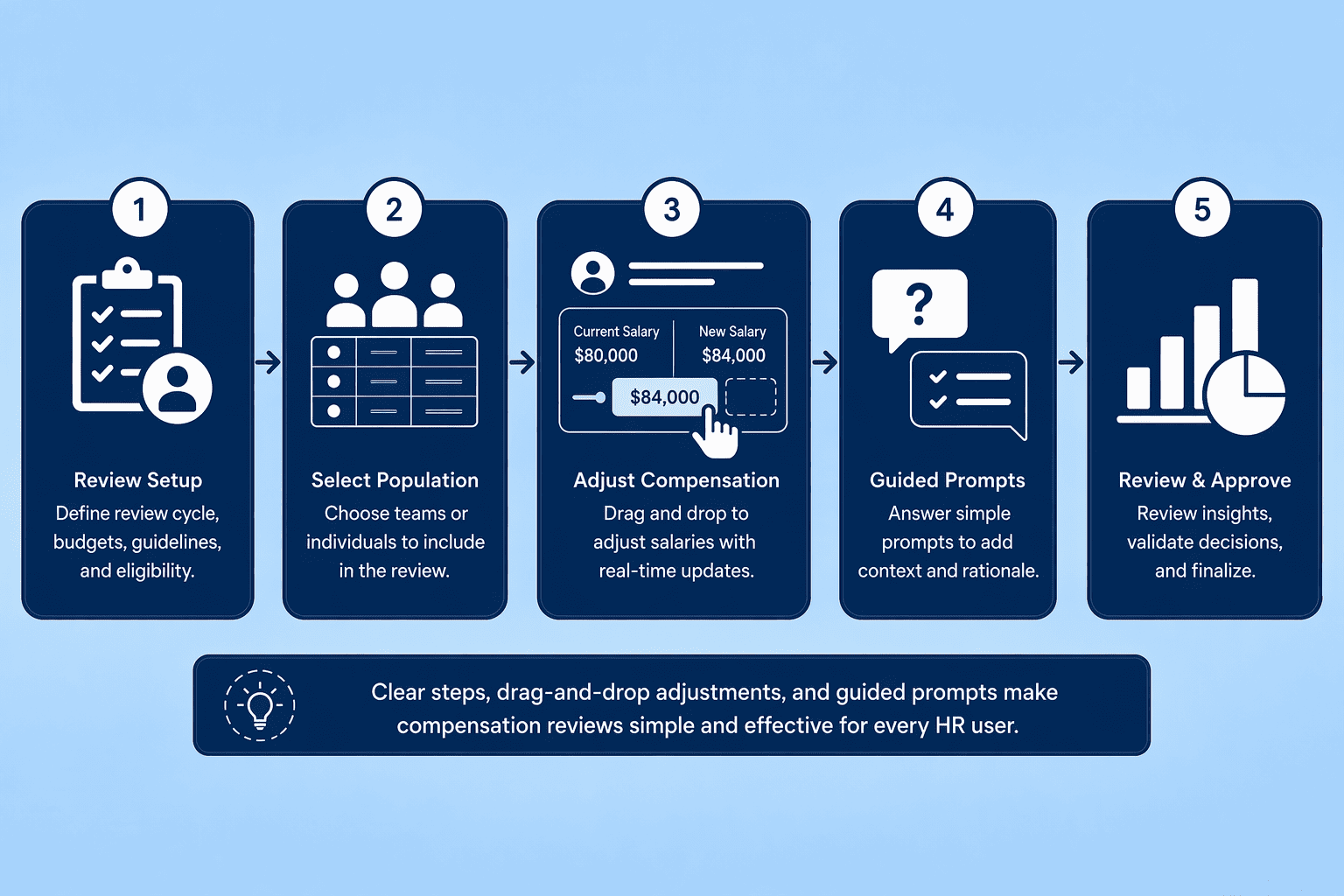
User-friendly compensation software is platform-level technology purpose-built for rewards professionals who do not speak SQL and have no desire to start. Unlike the legacy enterprise modules that required weeks of consultant-led configuration and a permanent IT liaison, these modern tools operate on a few core premises that any practitioner will recognize immediately. The interface uses the same logic you already know: a guided workflow that walks you through a merit cycle step by step, a drag-and-drop budget slider that recalculates the entire department the moment you move it, and a dashboard that shows you where you are against policy without a single pivot table. The Aeqium platform, for instance, specifically positions its customization capability so that teams can tailor the process 'without technical help.' That phrase defines the category.
The goal is to remove the friction that sits between a rewards leader and a defendable pay decision.
When HiBob, Rippling, or a compensation-focused player like CompUp loads employee data, it does so by connecting directly to your existing HRIS. The system pulls current salaries, job levels, performance ratings, and equity grants into one screen. From there, a manager executes the entire review cycle in a single pane: adjust a base salary, allocate a bonus from a guided budget, grant a retention stock unit, and submit for approval.
The platform enforces the guardrails you set. The ones a developer coded in a legacy batch file get left behind. The technical barrier evaporates.
A platform non-technical HR teams can actually use needs a set of features that work together. The table below names what separates a spreadsheet replacement from a pretty data viewer.
| Feature | What It Replaces | Why It Matters for Non-Technical Users | Example in Practice |
|---|---|---|---|
| Salary band management | Manually updated band spreadsheets that drift from market reality | Maintains clear, up-to-date pay ranges linked to job architecture and market data; prevents out-of-policy offers | A platform like CompUp lets you load industry-specific benchmark data and see where every employee sits relative to a band midpoint |
| Visual budget controls | Email chains with finance attaching static budget files and recalculating manually | A drag-and-drop interface that enforces the compensation budget in real time, showing immediate impact of any change on total spend | Managers adjust a slider and the system recalculates the department-level spend guardrail instantly, surfacing any breach |
| Automated approval workflows | Ad-hoc email approvals with no consistent audit trail or policy enforcement | Configurable multi-stage review chains that route proposals by compensation committee, finance, and HR, with all actions recorded | An HR leader sets a rule that any increase above 10% or off-cycle promotion triggers a VP sign-off; the system enforces it |
| Scenario modeling | Static, one-off What-If models built in a side spreadsheet that nobody shares | Interactive modeling tools that let HR simulate budget allocations, merit matrices, and equity refresh grants across multiple scenarios without altering live data | CompUp's simulation engine allows comp teams to test three budget scenarios at once and compare outcomes side by side |
| Guided salary review workflows | Weeks of data gathering from multiple systems, manual consolidation, and stakeholder coordination | A step-by-step interface that brings the process into one screen, with role-based access so managers see only their team and follow a defined, consistent flow | A manager receives a task to review their team, adjusts salaries inside a guided budget, and submits in one sitting |
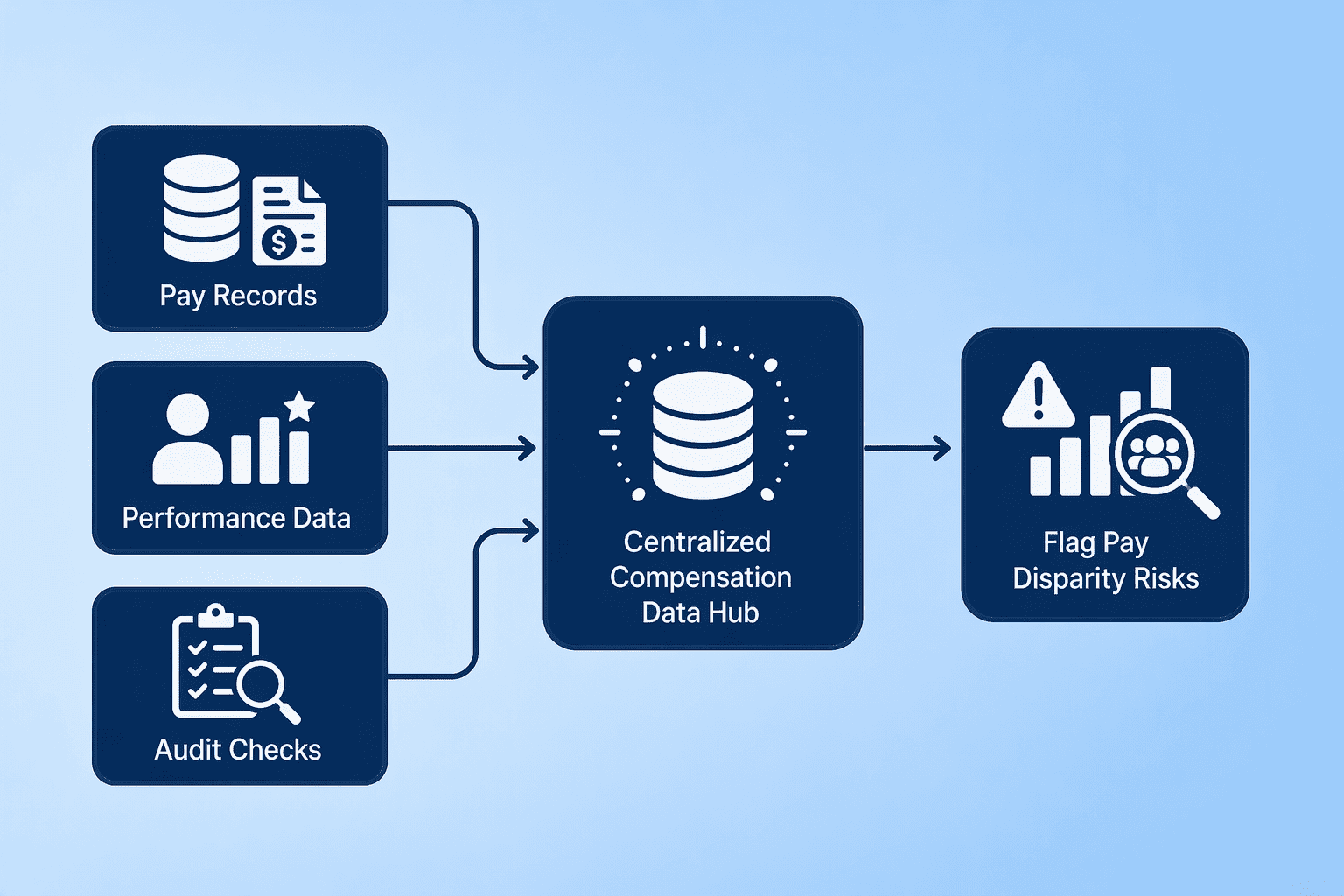
The operational purpose of compensation software is efficiency, but its risk-management purpose is to prevent the pay disparities that manual, spreadsheet-driven processes routinely allow to develop. When pay data, employee performance records, and full compensation history live in one system, HR gains the ability to analyze patterns that spreadsheets simply cannot surface.
Compensation management software centralizes pay data, employee performance, and compensation history to inform fair and consistent pay decisions. The software applies a consistent rule set to every decision, flagging any adjustment that creates a statistical anomaly against a peer group or a protected demographic. Compliance is built into the workflow, not bolted on as a report.
The platform also operationalizes market benchmarking at scale, pulling fresh external market data directly into the review screen. A rewards manager sets a target percentile policy (say, 60th percentile for engineering), and the system automatically flags any role where current pay is drifting below that line. The same infrastructure creates the audit trails that regulators and internal auditors demand: who approved what change, when, against what budget, and under what policy. Every click is recorded as a timestamped event, producing a far more defensible record than a spreadsheet with blended cell versions and a forwarding-chain email as its only documentation.
Entry-level compensation management software starts at $5 per employee per month, with base-fee plans opening at $49 a month plus $6 per person, while higher tiers run from $19 to $29 per employee at Deel and up to $180 a month plus $22 per person at Gusto.
The pricing landscape, however, splits cleanly into two categories that directly reflect the level of bundling. Across five publicly priced systems, entry-level plans start from $5 per employee per month, and prices climb into the hundreds of dollars a month at the higher tiers. Dedicated compensation tools, like a specialist simulation and review platform, typically run $6 to $15 PEPM.
Full HR suites that include compensation as one module among many, such as an all-in-one people platform that bundles payroll, benefits, and comp, sit in the $15 to $30 PEPM range. This distinction matters because the lower price tag of a dedicated tool reflects its focused scope, while the higher price of a suite reflects the convenience of a unified stack.
The pricing models also vary: two of the five products charge per employee or seat, two combine a base or platform fee with a per-person rate, and one bills annually by plan. Almost every vendor structures its plans by company size and feature access, with enterprise packages for advanced capabilities, such as global currency support or equity administration, typically hitting the 150-to-200-plus employee mark.
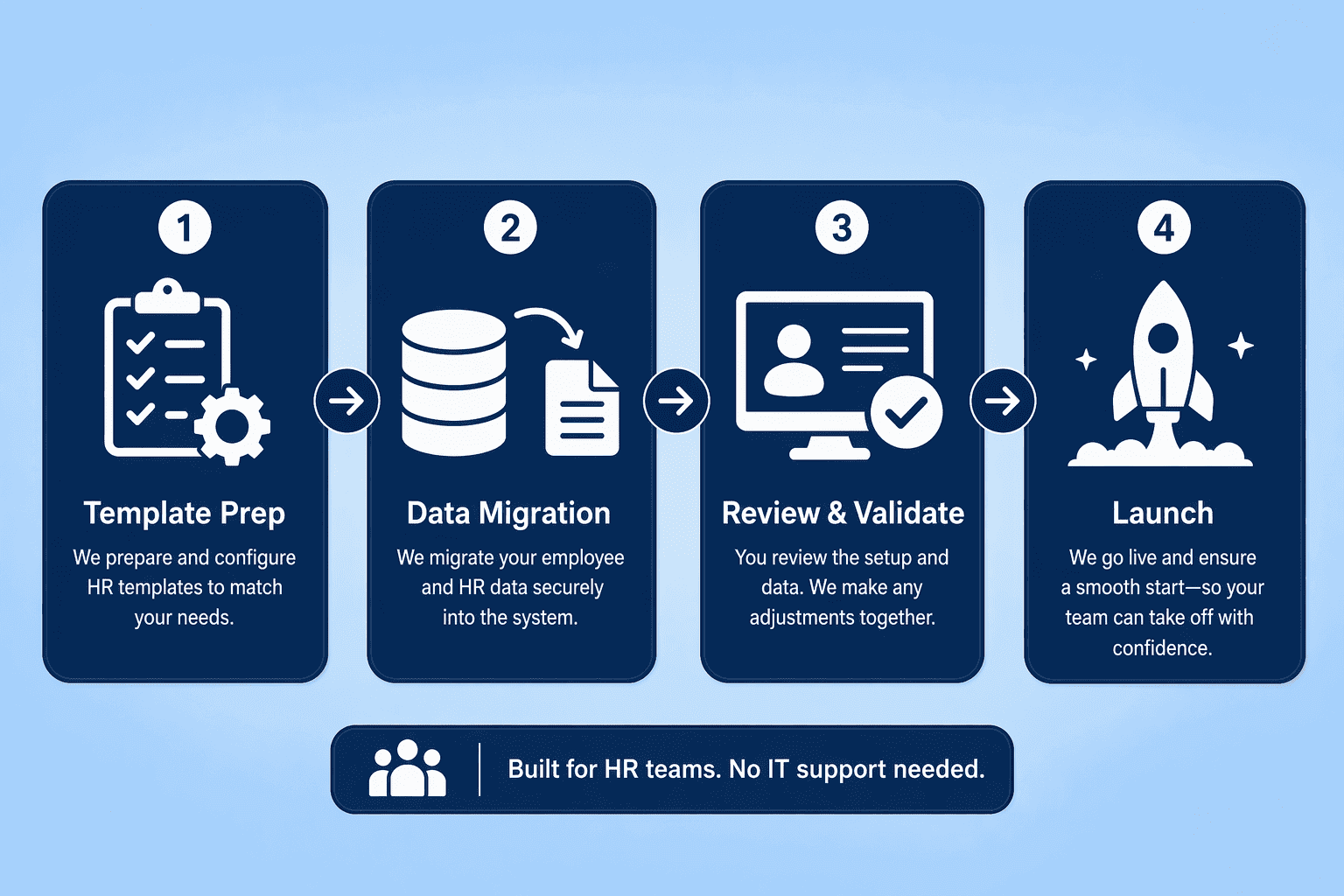
Implementation is the moment where a platform that tests well in a demo either embeds into the organization or becomes shelfware. The vendor's process design, not your internal IT resources, makes the difference. Here are the elements that drive adoption for teams that cannot lean on a dedicated technical implementation squad.
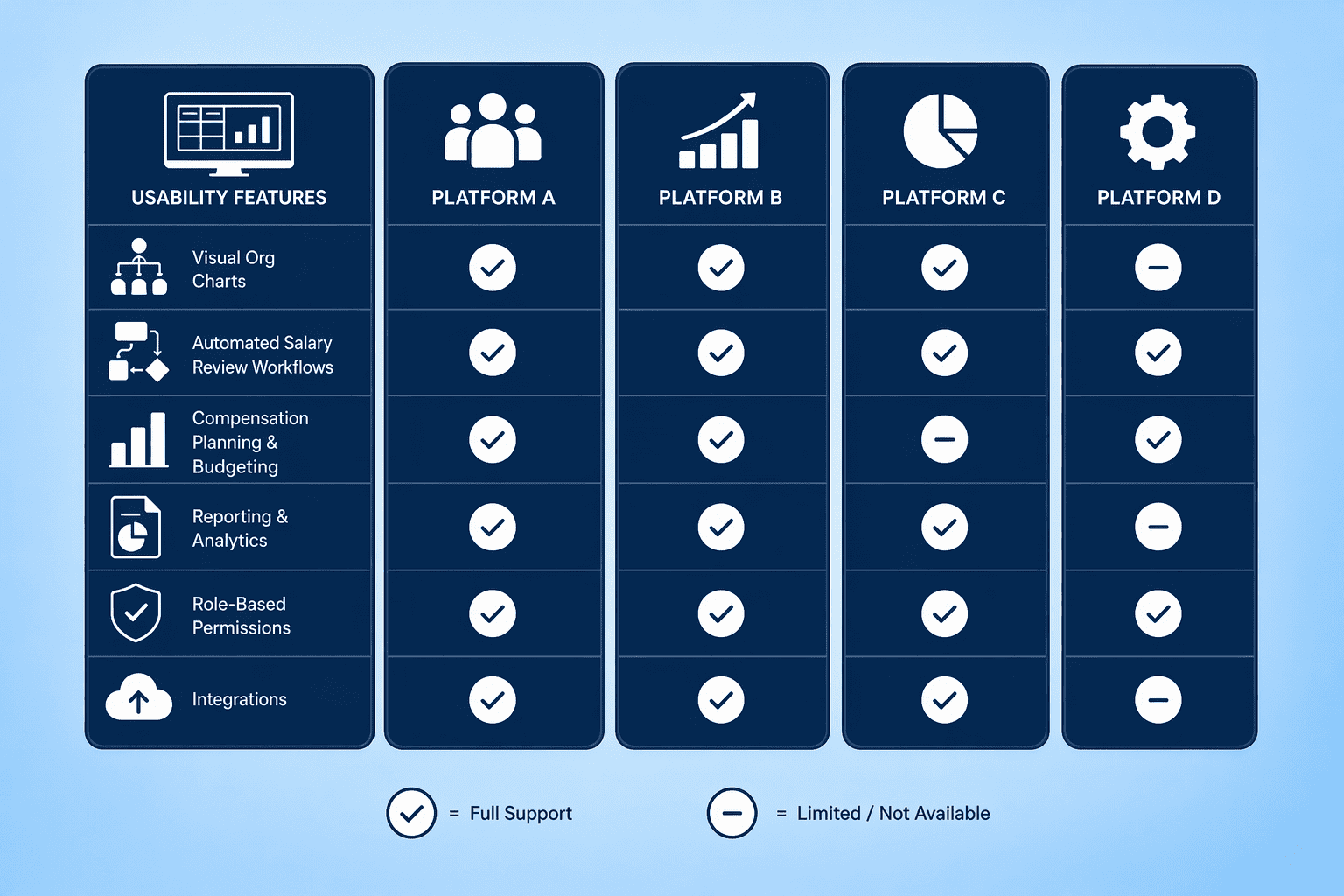
The market is crowded, but a handful of platforms consistently surface in user reviews as genuinely accessible to rewards teams without technical backgrounds. The table below places them side by side on the metrics that predict day-to-day usability for a typical HR operation.
| Platform | G2 Rating | Type | Key Features for Non-Technical HR | Best For |
|---|---|---|---|---|
| HiBob | 4.5/5 | All-in-one HRIS with compensation module | Visual org charts, automated salary review workflows, total rewards dashboards that surface equity and benefits alongside base pay | Mid-market companies (100 to 500 employees) that want compensation tightly integrated with core HR and a strong employee-experience layer |
| Rippling | 4.8/5 | All-in-one HR, IT, and finance platform | Unified data layer that automatically syncs any HR change into compensation, pre-built approval chains, drag-and-drop salary adjustment screens that pull real-time payroll data | High-growth companies that need compensation, benefits, and device management to speak to each other in one system |
| Deel | 4.8/5 | Global payroll and EOR with compensation module | Deel Payroll runs payroll in 150+ countries on infrastructure Deel owns and operates; built-in local compliance rules, multi-currency equity and bonus planning | Global and remote-first teams that need compensation governed by local employment law in dozens of countries simultaneously |
| Aeqium | 4.7/5 | Dedicated compensation and total rewards platform | Fully customizable review cycles without technical help, advanced scenario modeling, detailed compa-ratio dashboards, and market pricing grids | Lean comp teams (1 to 3 people) that run multiple review cycles a year without any HRIS admin support |
| CompUp | 4.9/5 | Compensation-specialized platform | CompUp integrates with BambooHR, Lattice, Darwinbox, and Workable; provides real-time market data, generates personalized Total Rewards Statements, and offers attrition analysis, People Analytics, and Workforce Planning modules in a unified interface | HR teams that want a platform purpose-built for compensation strategy, not bolted on as a module, and that value proactive pay-equity monitoring and strategic analytics alongside cycle execution |
Native integration is the technical backbone that makes compensation software usable. When you open your compensation review screen on launch day, the employee roster, current salaries, job codes, and manager hierarchies are already there, pulled silently from your HRIS. CompUp, for instance, integrates with BambooHR, Lattice, Darwinbox, and Workable, so the data flows automatically once the connection is authorized. You skip the step where you export a.csv from one system and re-import it into another.
Compensation management software connects to HR software to pull current team member data for salary adjustments, bonus allocations, and equity grants. This connection often runs both ways: after a review cycle closes, approved salaries and equity grants write back into the HRIS of record without manual data entry. A manager approves a 5% merit increase in the compensation tool, and that figure lands in the employee's BambooHR profile and flows into payroll automatically. The loop closes with no one in HR opening a spreadsheet or re-keying a figure into payroll.
The integration layer also reaches the performance and engagement systems that feed the comp decision. When Lattice populates a performance rating or a nine-box grid position, the compensation platform can read that signal to weight a merit matrix or flag a retention risk against a budget pool. The reverse works too: a completed compensation cycle can feed a Total Rewards Statement back into the employee's self-service portal on Lattice or BambooHR, giving the worker a clear view of their full package. No middleware consultant or obscure API key is required.
Operationally, you can keep the HRIS your HR generalists and employees already know and attach a compensation engine that speaks its language. This integration pattern separates tools built for 2026 from the monolithic suites of the previous decade, where every module had to come from the same vendor to function.
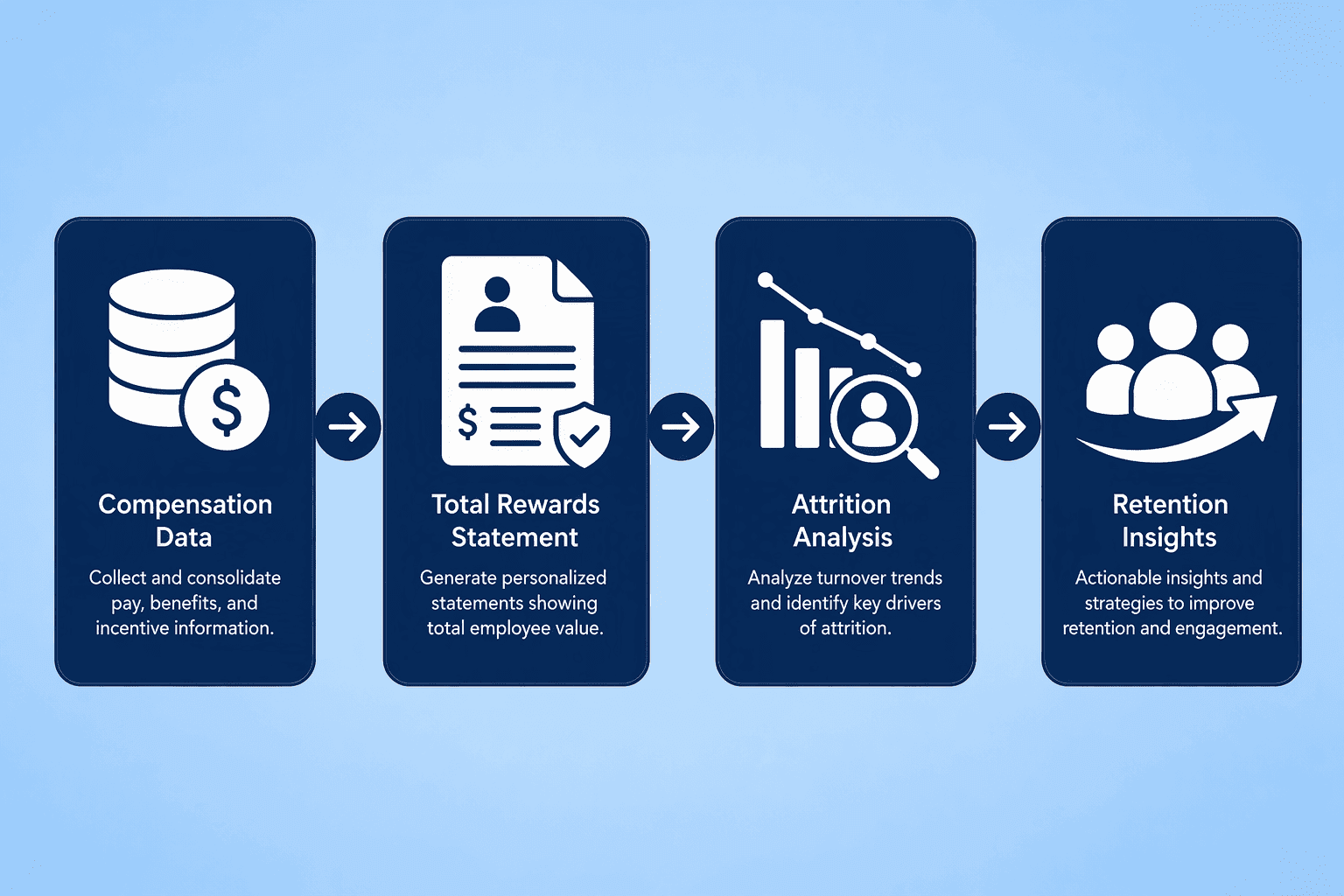
Once the core compensation cycle runs reliably inside a platform, the same data can be redirected toward a set of strategic outputs that directly influence retention and engagement. The most undervalued of these is the personalized Total Rewards Statement. CompUp, for example, can automatically generate personalized Total Rewards Statements at the close of the appraisal cycle. It aggregates base pay, bonus, equity value (with vesting status), benefits cost, and any special allowances into a single financial summary the employee receives directly. The psychological effect is material: an employee who has never calculated what their unvested options are actually worth suddenly sees a number, and that number anchors their thinking during any subsequent recruiter call.
The same platform infrastructure that enabled the review cycle also powers attrition analysis. The system holds a historical record of every compensation action, performance snapshot, and market benchmark tied to every employee. When someone resigns, the data set allows HR to answer a question that spreadsheet-era teams could only guess at: was the departing employee paid below market, below their peer group internally, or on a slower promotion trajectory? Running that analysis across a trailing twelve-month window identifies clusters: a department where departures correlate with lagging equity refreshes, or a job family where compa-ratios have been slipping for three quarters and attrition just spiked.
CompUp’s People Analytics and Workforce Planning modules build on this by projecting future comp costs under different growth scenarios. If the engineering headcount is set to grow 30% next year, the system models the total compensation spend including salary, bonus, and equity dilution impact. HR can walk into the annual planning meeting with a CFO-ready forecast.
This is how a guided, non-technical comp tool becomes a strategic command center. You move from administering pay to actively managing total talent cost.
Adopting compensation software designed for non-technical HR teams is a structural decision. A guided, integrated platform turns the compensation review from a defensive, error-prone exercise into a proactive cycle that yields market-aligned pay, demonstrable compliance, and the analytics to keep your best people. Tools like Aeqium, HiBob, and CompUp map directly to this need, each with a different weight on customization, suite depth, or global reach. The next step is to evaluate your data readiness, audit your current approval workflows, and book a demo that tests the system on the real scenario your team faces: a live merit cycle where a manager adjusts a salary, a budget recalibrates instantly, and compliance evidence writes itself. A good next step is seeing how CompUp puts this into practice.
When evaluating user-friendly compensation software, focus on three key features:
Modern compensation software provides three core compliance capabilities:
Dedicated tools run $6 to $15 per employee per month, while all-in-one HR suites with a compensation module cost $15, $30 PEPM. Most vendors offer tiered plans that scale by headcount, with enterprise packages for advanced features activating for companies over 150 to 200 employees.
Successful implementation of compensation software follows four key steps:
Keep manager workflows to under 10 minutes. Most deployments complete in 8 to 12 weeks.
Here is a breakdown of the top compensation software platforms by use case:
Modern platforms connect natively to major HRIS and performance systems, automatically pulling employee records, salaries, and ratings at the start of a review cycle. Approved adjustments then sync back to the HRIS, eliminating manual re-entry. This two-way flow makes the comp tool a smooth addition to your current stack.
Community Manager (Marketing)
As a Community Manager, I’m passionate about fostering collaboration and knowledge sharing among professionals in compensation management and total rewards. I develop engaging content that simplifies complex topics, empowering others to excel and aim to drive collective growth through insight and connection.
Revolutionizing Pay Strategies: Don't Miss Our Latest Blogs on Compensation Benchmarking